How To Add Components
1. Overview
- In the How To Make New Simulation Scenario tutorial, we have made an
s2e-userdirectory for our simulation scenario. - This tutorial explains how to add components to your scenario.
- A similar procedure is available for other components in the
s2e-core.- Please see the components listed in the components directory.
- The supported version of this document
- Please confirm that the version of the documents and s2e-core is compatible.
2. Add a Gyro sensor
- This chapter explains how to add a gyro sensor component to your
s2e-usersimulation case step by step. - Users can find the sample code of this section in s2e-user-example/sample/how-to-add-components.
-
Open & edit
user_components.hpp- Add the following descriptions at the one line below of
#include <components/real/cdh/on_board_computer.hpp>#include <components/real/aocs/initialize_gyro_sensor.hpp> - Add the following descriptions at the one line below of
OnBoardComputer *obc_; //!< Onboard ComputerGyroSensor *gyro_sensor_; //!< Gyro sensor
- Add the following descriptions at the one line below of
-
Open and edit
user_components.cpp-
Edit the constructor function as follows to create an instance of the
GyroSensorclass at the one line below ofobc_ = new OnBoardComputer(clock_generator);.// Common IniAccess iniAccess = IniAccess(configuration_->spacecraft_file_list_[spacecraft_id]); const double compo_step_sec = global_environment_->GetSimulationTime().GetComponentStepTime_s(); // Initialize of GYRO class std::string file_name = iniAccess.ReadString("COMPONENT_FILES", "gyro_file"); configuration_->main_logger_->CopyFileToLogDirectory(file_name); gyro_sensor_ = new GyroSensor(InitGyroSensor(clock_generator, 1, file_name, compo_step_sec, dynamics)); -
Add the following descriptions at the one line up of
delete obc_;in the destructor.delete gyro_sensor_; -
Edit the
LogSetupfunction as follows to register log outputvoid UserComponents::LogSetup(Logger &logger) { logger.AddLogList(gyro_sensor_); }
-
-
Open
user_satellite.iniand editinitial_angular_velocity_b_rad_sto add initial angular velocity.- Users can select any value.
-
Add the following descriptions at the bottom line of
[COMPONENT_FILES]to set the initialize file for the gyro sensor.gyro_file = ../../data/initialize_files/components/gyro_sensor_xxx.ini -
Build the
s2e-userand execute it -
Check the log output file to find
gyro_sensor1_measured_angular_velocity_c, the gyro sensor's output angular velocity value in the component frame.- Since the default initializing file is described as that the sensor has no noise, the value of
gyro_sensor1_measured_angular_velocity_candspacecraft_angular_velocity_bis completely the same.
- Since the default initializing file is described as that the sensor has no noise, the value of
-
Edit the
data/initialize_files/components/gyro_sensor_xxx.inifile to add several noises, and rerun thes2e-user -
Check the log output file to find
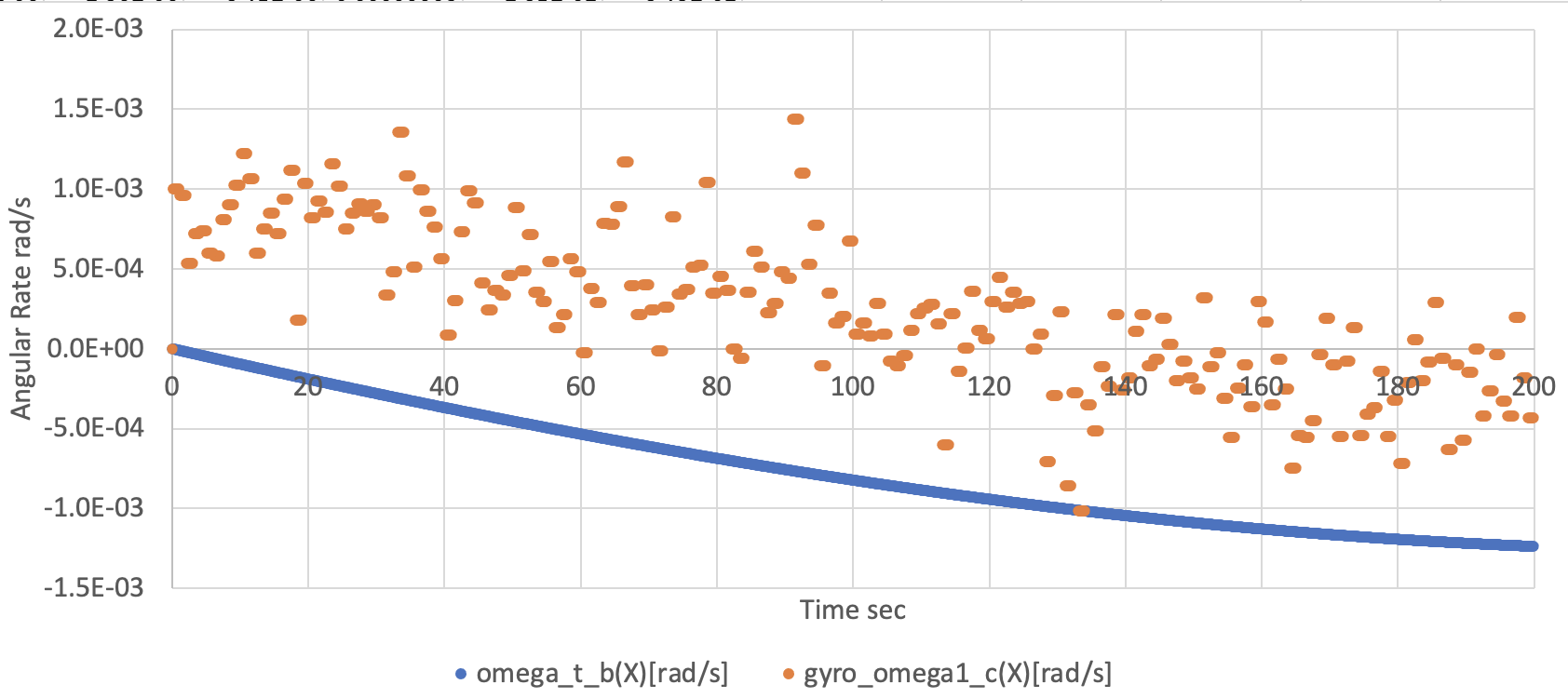
gyro_sensor1_measured_angular_velocity_c. Now the sensor output has several errors you set in the initialize file like the following figure.- We edited the file as
constant_bias_c_rad_s(0) = 0.001andnormal_random_standard_deviation_c_rad_s(0) = 0.001to get the following figure.
- We edited the file as
3. Add another Gyro sensor
- You can add multiple components in your
s2e-usersimulation case similar to the above sequence.
-
Open
user_components.hpp -
Add the following descriptions at the one line below of
GyroSensor *gyro_sensor_;GyroSensor *gyro_sensor_2_; //!< Gyro sensor 2 -
Open
user_components.cpp -
Edit the constructor function to add the following description to create the second instance of the GYRO class
file_name = iniAccess.ReadString("COMPONENT_FILES", "gyro_file_2"); configuration_->main_logger_->CopyFileToLogDirectory(file_name); gyro_sensor_2_ = new GyroSensor(InitGyroSensor(clock_generator, 2, file_name, compo_step_sec, dynamics)); -
Add the following descriptions at the one line below of
delete gyro_;in the destructordelete gyro_sensor_2_; -
Edit the
LogSetUpfunction as follows to register log outputvoid UserComponents::LogSetup(Logger &logger) { logger.AddLogList(gyro_sensor_); logger.AddLogList(gyro_sensor_2_); } -
Open
user_satellite.ini -
Add the following descriptions at the bottom line of
[COMPONENT_FILES]to set the initialize file for the gyro sensorgyro_file_2 = ../../data/initialize_files/components/gyro_sensor_yyy.ini -
Copy the
data/initialize_files/components/gyro_sensor_xxx.inifile and rename it asgyro_sensor_yyy.ini -
Edit
gyro_sensor_yyy.inito custom the noise performance of the second gyro sensor- Edit sensor ID like
[GYRO_SENSOR_1]to[GYRO_SENSOR_2] - Edit sensor ID like
[SENSOR_BASE_GYRO_SENSOR_1]to[SENSOR_BASE_GYRO_SENSOR_2]
- Edit sensor ID like
-
Build the
s2e-userand execute it -
Check the log output file to find
gyro_sensor2_measured_angular_velocity_c, the second gyro sensor's output angular velocity value in the component frame.