How To Add Control Algorithms
1. Overview
- In the How To Make New Components tutorial, we have newly made components emulating codes and adding the new components into our simulation scenario.
- Now we can simulate the behavior of spacecraft free motion and emulate the behavior of sensors and actuators.
- This tutorial explains how to add a Control Algorithm to the simulation scenario.
- For a practical satellite project, we should implement the control algorithm as actual flight software like C2A into the S2E. However, using actual flight software is usually overdoing for use cases such as research and the initial phase of satellite projects.
- So, we introduce the following three methods, and users can choose a suitable method.
Direct method: Directly control physical quantity without sensors, actuators, and their noises- For theoretical research and preliminary analysis for satellite projects
Component method: Control using sensors and actuators without flight S/W framework- We can include sensing and actuation noise.
- For engineering research and preliminary analysis for satellite projects
- From v6.0.0, we have
idealandrealdirectories in thes2e-core/src/components. Users can useidealcomponents for the early stage of the analysis and can userealcomponents for more detailed analysis. Mixing these components is also possible.
Flight S/W method: Control using sensors and actuators with flight S/W framework- For actual satellite projects
- The supported version of this document
- Please confirm that the version of the documents and s2e-core are compatible.
2. Direct method
- This chapter introduces how to add a control algorithm without sensors and actuators.
- This method directly measures the satellite's physical quantity and generates torque and force acting on the satellite.
- To do that, users need to edit the
Updatefunction in theUserSat.cpp.- A sample code is in s2e-user-example/sample/how-to-add-control-algorithm-direct-method
- The
UserSatelliteclass already has satellite attitude, orbit, and local environment information since it inherits theSpacecraftbase class. So users can easily access these values. - To measure physical quantities, users can use getter functions defined in the
Attitude,Orbit, andLocalEnvironmentclasses asdynamics_->GetAttitude().GetAngularVelocity_b_rad_s(). - To generate torque and force, users can use
dynamics_->AddTorque_b_Nmanddynamics_->AddForce_b_N. - The sample codes are in
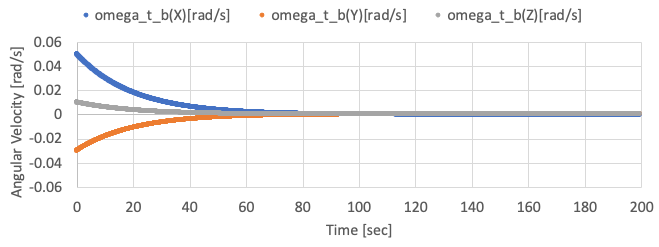
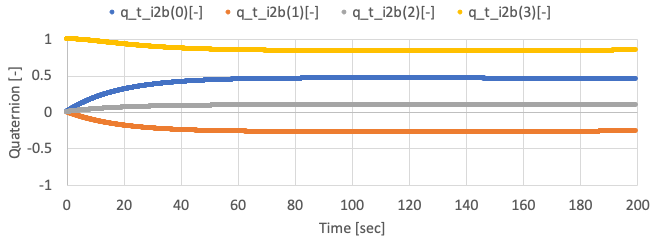
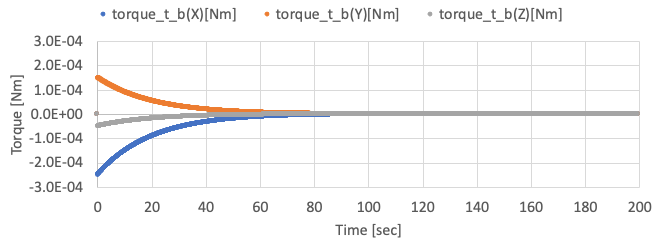
SampleCodes/control_algorithm/direct_method/user_satellite.cpp, and you can see very simple detumbling with the proportional control method. - By using the sample code with initial angular velocity = [0.05, -0.03, 0.01] rad/s, the following results are given.
-
You need to edit the initialize file to set the initial angular velocity.
-
3. Component method: Using ideal components
- TBW
- Users can refer the s2e-ff as an example of the ideal component method.
4. Component method: Using real components
- This chapter introduces a method to add a control algorithm using realistic sensors and actuators. - This method measures a satellite's physical quantity via sensors, generates torque and force via actuators, and executes control algorithms on OBC.
- This tutorial assumes the spacecraft has a three-axis gyro sensor, a reaction wheel, and an OBC.
- The sample codes are in s2e-user-example/sample/how-to-add-control-algorithm-using-real-component.
- Firstly, users need to make the
UserOnBoardComputerclass to emulate the OBC.- Copy the
user_on_board_computerfiles to thes2e-user/src/componentsfrom thecomponent_method/src/components, and add theuser_on_board_computer.cppto theset(SOURCE_FILES)in theCMakeLists.txtto compile it. - The
UserOnBoardComputerclass has theUserComponentsclass as a member, and users can access all components to get sensing information or set the output of actuators. - In this tutorial, the angular velocity is measured by the gyro sensor. After that RW's output torque is calculated using the X-axis of the measured angular velocity, and the torque is set to RW.
- Copy the
- Next, users need to add the
UserOnBoardComputerinto theUserComponentsclass. You can copy theuser_componentsfiles to thes2e-user/src/simulation/spacecraftfrom thecomponent_method/src/simulation. - Finally, users need to add new source codes to the
CMakeLists.txtto compile them.- You have to add
reaction_wheel_xxx.initos2e-user/data/initialize_files/components - Refer to
SampleCodes/control_algorithm/component_method/data/reaction_wheel_xxx.iniif necessary.
- You have to add
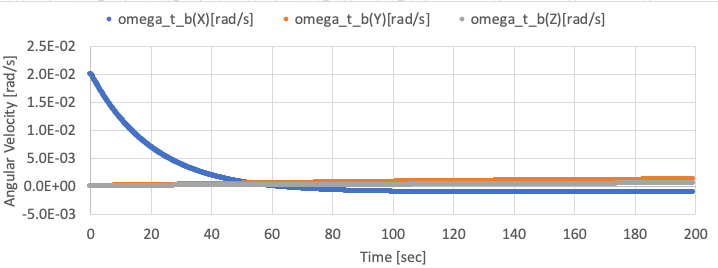
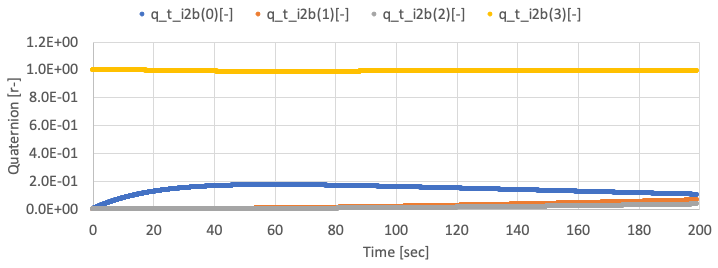
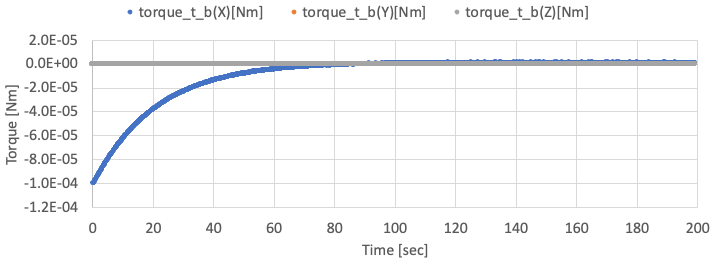
- By using the sample code, the following results are given.
-
The X-axis angular velocity is controlled, but other axes are not controlled well since the satellite only has an RW on X-axis. The X-axis angular velocity has offset value since the gyro has offset noise.
-
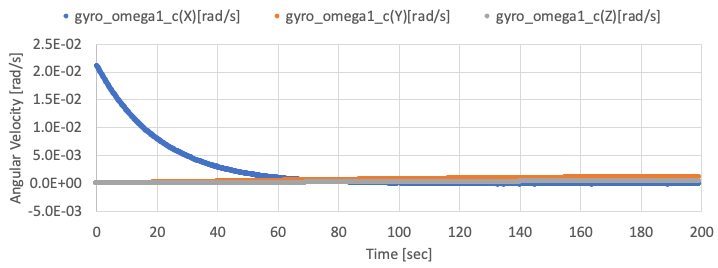
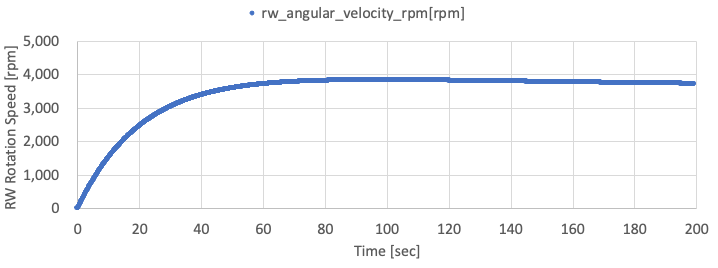
The following two figure shows the observed angular velocity by gyro and the rotation speed of the RW. You can find the observed X-axis angular velocity reaches zero by the control.
-
5. FlightSW method: Control algorithm within C2A
- TBW
- Users can refer the s2e-aobc as an example of the flight software method.